JQuery Fundamentals
Typically, the JavaScript was considered to be a clumpsy and difficult language to be used in the application development. The applications were designed to make use of javascript to support the validations, styles but the effort required to fix the browser compatibility superseded the benefit of client side scripting. Before the discovery of CSS the applications were developed by coupling the functionality and structure (HTML) together.
< type="button" id="”btnClick”" onclick="document.getElementById('txtName’).style.color='blue';">
Please click here
< / button>
The addition of CSS in the web development world allows us to separate the structure from the stylistic details of the HTML. It also gives us the flexibility to completely change the style by changing the different style sheet.
< type="text/javascript">
window.onload = function() {
document.getElementById(' btnClick ').onclick = ChangeColor;
};
Function ChangeColor ()
{
document.getElementByID(‘txtName’).style.color = “Blue”
}
< / script>
< type="button">
Please click here
In the above example, the structure is separated from functionality. This approach of separating the structure from functionality through javascript is called “Unobtrusive Javascript”
The JQuery drew a huge attention amongst developer for its ability to support the development of unobtrusive JavaScript’s. JQuery works very well with the HTML page and performing operations on the DOM elements with significantly less lines of code. The scripts developed in JQuery model works well in all major browsers.
JQuery has great features like
DOM Selectors
DOM manipulation
Animation
HTML traversing
Wednesday, March 18, 2009


Sunday, January 11, 2009
Great Quotes from the book "The one minute entrepreneur"
I had an opportunity to read the book "The one minute entrepreneur" free of cost :) in the book store. The book touches the greatest suggestion from various speakers from motivation gurus to sales gurus, management geniouses to traning gurus. One thing i picked after reading that book was writing down on the book about what we learned on that day.
The authors suggests that "To be a succesful entrepreneur one should cultivate an attitude of writing down the learnings in one word in one minute.". I hope this book is a great guide for everyone dreaming to be an entrepreneur.
The authors suggests that "To be a succesful entrepreneur one should cultivate an attitude of writing down the learnings in one word in one minute.". I hope this book is a great guide for everyone dreaming to be an entrepreneur.
Friday, January 2, 2009
Cross Browser Compatibility
A recent report in the internet indicated the decline in number of Microsoft internet explorer user’s base. The percentage of IE users declined to 68% from 74% in the 6 months time period. Meanwhile Mozilla’s firefox saw an increase in usage to 24% from 17%.
The decline in IE usage is attributed to several factors including the increase in the sales of Apple MAC using Safari, increase usage of Googles Chrome and open source Mozilla’s FireFox.
The application developments should be more focused to support Cross-browsers.
The decline in IE usage is attributed to several factors including the increase in the sales of Apple MAC using Safari, increase usage of Googles Chrome and open source Mozilla’s FireFox.
The application developments should be more focused to support Cross-browsers.
Sunday, December 28, 2008
jQuery - The cool stuff
The introduction of jQuery and its support in Microsoft's visual studio gonna revolutionize the programmer world with its easy to use interface, built-in features to support cross-browser issues, CSS3 compliance etc., I realized the meaning of "The write less, Do More" after playing around with the jquery package :) . watch for More posts on this cool stuff - !!!!
Tuesday, October 7, 2008
WSE - Web Service Enhancements in VS2008
Web service Enhancements in Visual Studio 2008
Web Service Enhancements
It is a class library primarily focused on building the message-level security using the latest protocols, that includes security, trust and addressing. These capabilities can be added to the application at design time using code or at runtime using the policy file.
WSE in Visual Studio 2003
The addition of WSE to the visual studio 2003 project is straight forward.
• Create a project in Visual Studio 2003.
• Create the Web service reference in Visual Studio 2003.
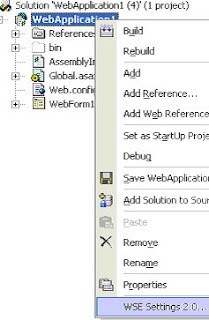
• Right click on the project and select “WSE settings 2.0”
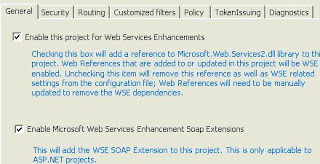
• Check the option “Enable this project for Web Service Enhancements”
• Notice the reference class file being generated with the WSE class members.
WSE in Visual Studio 2008
Visual studio 2008 doesn’t support or implement WSE in any way. The best way to get around this problem is
• Create a web reference in Visual studio 2008 (it doesn’t implement WSE).
• Copy the content of the web reference folder created in 2003. (Follow the steps mentioned under the section “WSE in Visual Studio 2003”)
• Paste it in the web reference folder of the VS2008 project.
• Refresh the VS2008 project.
Web Service Enhancements
It is a class library primarily focused on building the message-level security using the latest protocols, that includes security, trust and addressing. These capabilities can be added to the application at design time using code or at runtime using the policy file.
WSE in Visual Studio 2003
The addition of WSE to the visual studio 2003 project is straight forward.
• Create a project in Visual Studio 2003.
• Create the Web service reference in Visual Studio 2003.
• Right click on the project and select “WSE settings 2.0”
• Check the option “Enable this project for Web Service Enhancements”
• Notice the reference class file being generated with the WSE class members.
WSE in Visual Studio 2008
Visual studio 2008 doesn’t support or implement WSE in any way. The best way to get around this problem is
• Create a web reference in Visual studio 2008 (it doesn’t implement WSE).
• Copy the content of the web reference folder created in 2003. (Follow the steps mentioned under the section “WSE in Visual Studio 2003”)
• Paste it in the web reference folder of the VS2008 project.
• Refresh the VS2008 project.
Subscribe to:
Posts (Atom)